A Practical Guide to Cleaning Active IT Cabinets While Running
Data centers and server rooms are the backbone of modern IT infrastructure. However, one often-overlooked maintenance task is regular cleaning—not of the floors or windows, but of the equipment itself. Dust, small debris, and poor ventilation are silent enemies of operational continuity. This guide covers how to safely and effectively clean active IT racks and servers while running without risking data loss or hardware damage.
A Practical Guide to Cleaning Active IT Cabinets and Servers While Running
By Ashraf Almuhtaseb | Data Center Technical Cleaning Expert | idata.center
Data centers and server rooms are the backbone of modern IT infrastructure. However, one often-overlooked maintenance task is regular cleaning—not of the floors or windows, but of the equipment itself. Dust, small debris, and poor ventilation are silent enemies of operational continuity. This guide covers how to safely and effectively clean active IT racks and servers while running without risking data loss or hardware damage.
The Importance of Cleaning
Dust is a thermal insulator. When it accumulates on heatsinks, fans, and vents, it traps heat—and heat is the biggest enemy of server lifespan. Even a thin layer of dust on a CPU heatsink can raise the temperature by several degrees Celsius, pushing components closer to their thermal cutoff points or, in the worst cases, to premature failure.
Besides heat, dust buildup poses other risks:
• Electrostatic Discharge (ESD): Fibrous dust particles can carry static electrical charges that damage sensitive components.
• Airflow Obstruction: Blocked intake and exhaust vents force cooling systems to work harder, increasing energy consumption and fan wear.
• Corrosion: In humid environments, moisture-absorbing dust can become slightly conductive, contributing to circuit board corrosion over time.
• Fire Hazard: In extreme cases, dense dust accumulation near high-power components poses a real fire hazard.
Regular cleaning—at least quarterly, and monthly in dusty environments—is one of the most cost-effective forms of preventative maintenance.
Safety First: Before You Touch Anything
Cleaning operational and powered infrastructure requires careful attention. The goal is to keep the environment clean without disrupting services. Before you begin:
• Risk Assessment: Know what is in operation. Identify any systems that cannot tolerate even short outages—databases, real-time applications, or backup cluster nodes where the failure of one unit shifts the load to others.
• Plan to control static electricity. Wear an anti-static wristband connected to the cabinet frame (not to an electrical ground). Use static-proof tools and bags when removing any components.
• Use appropriate equipment: Household vacuum cleaners generate significant static electricity and may cause components to come loose.
• Environments where electrical equipment is operating: The following tools and equipment may be used:
- Compressed air canisters should be used sparingly (short bursts, held vertically) only for areas inaccessible to cleaning brushes with a suction head.
They are not recommended for extensive use on all components of the server cabinet or on running server fans.
- Anti-static vacuum cleaners specifically designed for electronic devices
- Lint-free microfiber cloths
- Isopropyl alcohol (70% or higher) for direct cleaning
Note: Never use water or ordinary household cleaning sprays near electrical equipment under any circumstances. Do not spray cleaning materials directly onto external surfaces or server equipment (even if they are safe). Instead, spray a very small amount, without over-wetting the cloth, and then proceed with cleaning.
Cleaning the Cabinet Itself
The cabinet frame, cable management arms, blank panels, and doors can usually be cleaned without affecting running systems.
-Start at the top and work your way down. Use a lint-free cloth, slightly dampened with isopropyl alcohol, to wipe shelf rails, side panels, and door frames. For perforated doors and cover panels, use a soft brush or compressed air (directed away from the equipment) to remove accumulated dust.
-Pay close attention to cover panels. Empty rack units without cover panels are a common cause of poor airflow, as hot air from the back of the rack is forced back into the front vents. Ensure all unused areas are covered and clean any existing cover panels so they are securely fastened.
Cleaning Servers in Operation
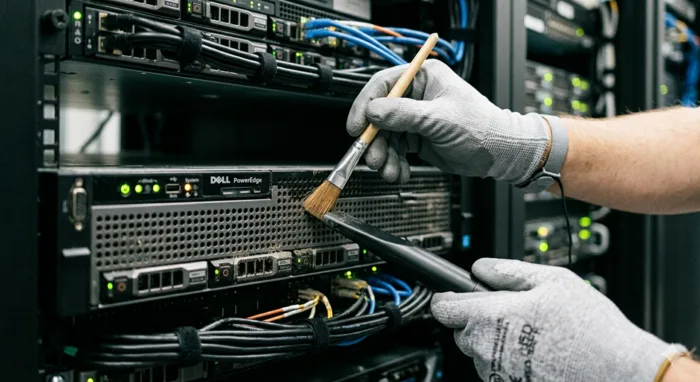
This is where precision is key. The goal is to remove dust from external surfaces and vents without opening the chassis or affecting airflow while the system is running.
· External Surfaces and Frames: Use a lint-free cloth to wipe the front of each server. Many servers have removable front frames, which can be safely disassembled, cleaned separately, and reassembled without touching the system underneath. It is important to consult with your data center manager or site supervisor before performing this operation
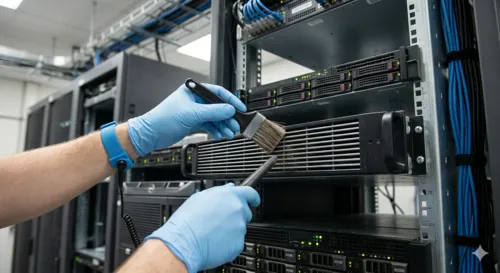
· Intake and Exhaust Vents: This is the highest priority area. Use short bursts of compressed air directed away from the server, blowing dust out of the intake vents rather than pushing it into the chassis. Hold the can at an angle to avoid air splashing, and keep the bursts short to prevent condensation.
Note: For servers, do not attempt to stop fans using compressed air. Spinning the fan in reverse or at abnormal speeds can cause sudden voltage spikes. Ensure that the surges are short and away from the fans.
• Monitor temperatures during cleaning: If your server manufacturer's IPMI/iDRAC/iLO interface or environmental management software is available, monitor CPU and air intake temperatures during operation. A sudden temperature spike may indicate an accidentally blocked vent or disrupted airflow. Most modern servers also provide alerts via fan speed changes—a significant increase in fan noise is a signal to stop and assess.
When to schedule a deep clean?
Schedule deep cleans during planned maintenance periods. In high-availability environments, coordinate with your change management team and ensure that fault bypass systems are checked before shutting down any unit.
Create a cleaning schedule
A documented cleaning schedule is more reliable and includes wiping down the exterior surfaces of racks and rails, cleaning front edges and cover plates, and replacing air filters (if applicable) according to the manufacturer's recommendations.
Record each cleaning session with the date, technician's name, and any observations—unusually high component temperatures, visible wear, or unusual dust patterns may indicate airflow issues. These records are crucial for identifying trends before they escalate into malfunctions.
Cleaning is a preventative measure, not a cure. The best way to minimize cleaning frequency and protect equipment is to control the environment.
*Electronic data processing equipment requires careful control of relative humidity: High relative humidity can lead to condensation inside equipment, while low relative humidity can generate static electricity. Rapid changes in relative humidity should also be avoided due to their impact on barcode readers, magnetic tapes, disks, and data processing equipment.
Generally, the recommended relative humidity for computer systems ranges between 35% and 55%. However, the manufacturer's recommendations for operating specific equipment should always be followed. (You can refer to ASHRAE Humidity Guide at the following link:
https://www.ashrae.org/file%20library/technical%20resources/covid-19/i-p_s16_ch22humidifiers.pdf)
Clean equipment operates in a well-managed environment at a lower temperature, experiences fewer downtime, and lasts longer. The time invested in a regular cleaning routine is more than worthwhile, extending equipment lifespan and preventing unforeseen maintenance.
Cleaning active IT infrastructure is a simple process that requires the right tools, a structured approach, and a regular schedule. It may not be the most glamorous task, but it's one of the most cost-effective actions an IT team can take to protect the reliability of the systems they manage.
About the Author
Ashraf Almuhtaseb is a Data Center Technical Cleaning Expert with over 9 years of specialized experience since 2017. He is the only independent professional in the MENA region — and one of very few globally — publishing dedicated, in-depth technical knowledge on data center cleaning standards, contamination control, and ISO 14644 compliance. Visit idata.center for more articles, guides, and resources.
© Ashraf Almuhtaseb | idata.center | All rights reserved
© 2026 Ashraf Almuhtaseb | wurriors.com | All rights reserved